JWT ECDSA signing in JavaScript

This article will go through how to implement JWT ECDSA signing to provide trusted, read-only tokens to a front-end app. This example is in JavaScript (Node.js on the back-end), but these concepts can be easily translated to other languages.
What's a JWT?
The jwt.io website says it best:
JSON Web Tokens are an open, industry standard RFC 7519 method for representing claims securely between two parties. JWT.IO allows you to decode, verify and generate JWT.
It's essentially a way of packaging data up and sharing it so that it can be trusted. Here is an example of what a JWT looks like:
eyJhbGciOiJFUzI1NiIsInR5cCI6IkpXVCJ9.eyJuYW1lIjoiVGluYSIsImVtYWlsIjoiaW5mb0B0aW5hY2lvdXNkZXNpZ24uY29tIiwiaWF0IjoxNTcyMDU4NDc3fQ.UnoPrB9tqBwAJPM8v_5xihFaMdfK0fQdeJFmhhvEpv9Im79eGvuY5HJ2USrc6caBqae4sTBY59nCfjnmg2Hzyw
There are 3 parts to the JWT token, and they are separated by a period:
- Header: Contains information about the token, e.g. identifying itself as a JWT, and also mentions which algorithm it uses.
- Payload: The data contained within the token
- Signature: The signature, which includes relevant signing details for the selected algorithm, as well as expiry, if applicable.
If you go to the jwt.io website, you will see the following output:
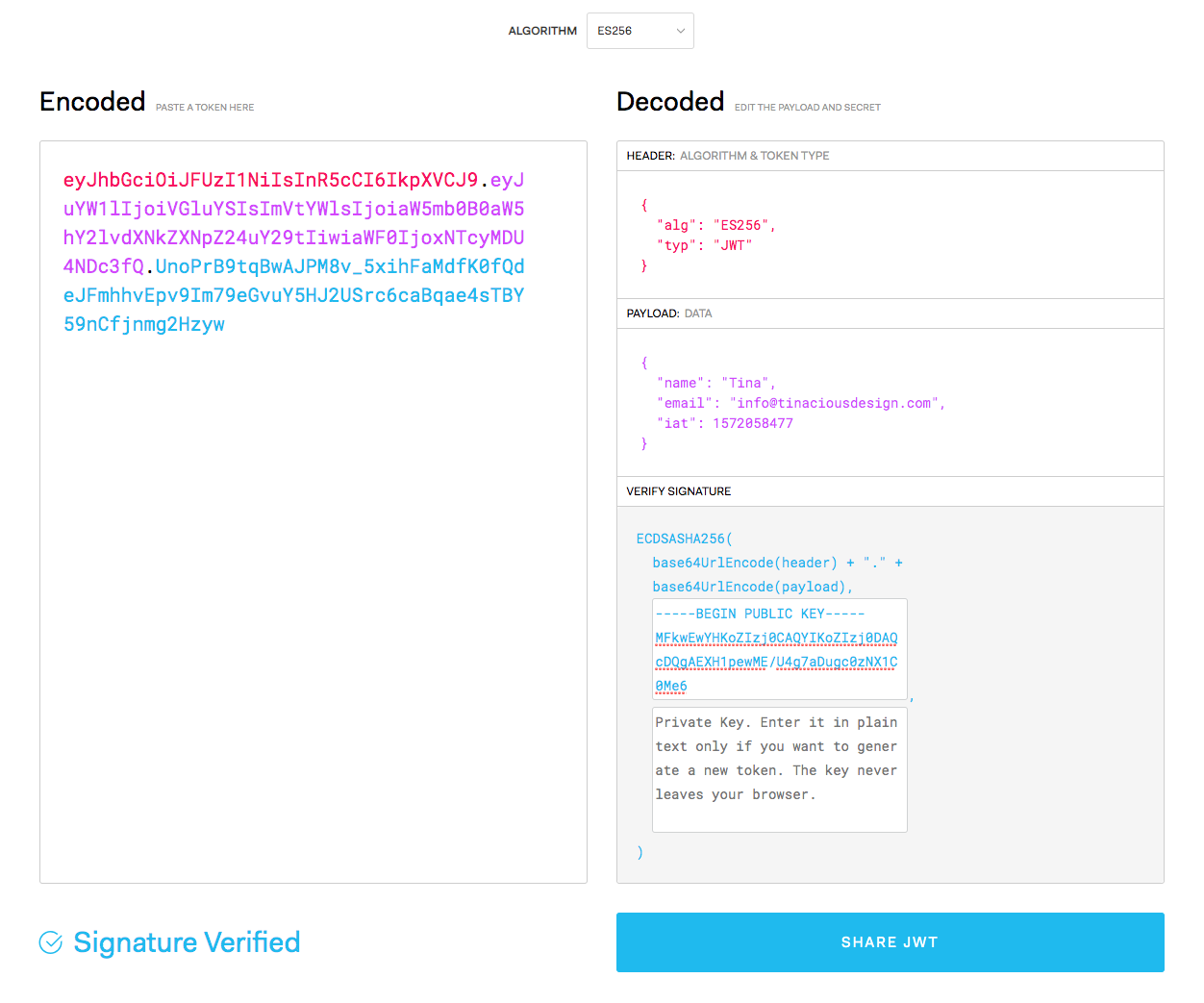
Here is the contents of that token:
{
"name": "Tina",
"email": "info@tinaciousdesign.com",
"iat": 1572058477
}
Why are JWTs useful?
JWTs are a useful way to share data so it can be trusted. The format is JSON which makes it nice to work with, especially in JavaScript. One of the benefits of using JWT to share data over the wire is that you do not need to verify or validate anything contained in the JWT with a third-party—you can save on the extra network requests to your database and trust the contents of it to be true. One of the drawbacks with using JWTs is, even though they can expire, they cannot be revoked—you should be able to trust the data contained within the token, but whether that data is still relevant is uncertain.
Why do it this way instead of the default way?
The default implementation of JWT encoding and decoding uses a single private key for both reading and writing. This is fine if you are only reading it on the back-end, where your private key is safe. If you are trying to read a JWT token on the front-end, you do not want to expose the private key. The reason for this is because the private key can be used to both read and write JWT tokens. If you've exposed your private key on the front-end, then you can no longer trust it as anyone could've seen it and could use it to encode data. Exposing your private key is about as good as not even implementing JWT encoding and decoding protections.
What's ECDSA?
ECDSA stands for Elliptic Curve Digital Signature Algorithm. It's essentially a cryptographic strategy for creating private and public key pairs. ECDSA is very similar to how SSH keys work (which use RSA), except it uses a different algorithm. Though not as popular as RSA, it's a safer option with less foot guns. Modern browsers implement ECDSA as a crypto strategy for reading SSL certificates. ECDSA differs from other JWT signing approaches that are symmetrical:
- Symmetrical: read and write using the same key—these should never live on the client or be publicly accessible
- Asymmetrical: read and write use different keys (public and private key pairs). If you need to read the contents of a JWT on the front-end while still trusting it, this is your best bet.
What does a JWT ECDSA implementation look like?
Essentially, to implement JWT with ECDSA, you would follow a series of steps:
- Generate a private-public key pair signed using elliptic curve cryptography (ECC) algorithm ECDSA
- Use the private key on the back-end to sign your token
- Use the public key on the front-end to verify your token and read the data
Generating a private-public ECDSA key pair
First, you'll need to generate a private-public key pair, similar to how SSH keys work. I used OpenSSL to generate my keys. You should keep the private key private, but it's fine if the public key is out there as JWT tokens cannot be authored with this key.
Sign your data with the private key on the back-end
Now that you have your keys, it's time to start making some data. You can encode any JavaScript object. Please note that this data is not private as any JWT token can be decoded on jwt.io whether there's a key or not, so if you are trying to conceal sensitive data, this is not the way to do it. For example, never store passwords or sensitive data with JWT.
Read your data with the public key on the front-end
Using the public key, use the JWT.verify method to verify the validity of the signature and view the contents of the data. If the signature does not pass, you should obviously not trust it. There is a method available in the referenced library to decode JWT tokens without verifying the signature. You want to make sure you use verify so that you verify the signature.
Sample code implementing JWT ECDSA asymmetrical signing
Back-end code
- Generate private and public keys
- Sign the data using the private key
- Share the public key with the front-end
Front-end code
- Make an API request to get encoded data and public key
- Securely decode the token using
JWT.verify - Display the data in the view
This JWT ECDSA implementation will have all the code examples you need.
Summary
Asymmetrical signing with private-public key pairs is useful if you ever need read-only access to data on the front-end. As specified above, if you plan on reading JWT tokens on the front-end, you definitely want to use an implementation that leverages private and public key pairs. This is because if you expose your private key to the front-end, there's actually no point to even using JWT tokens as this data can now be forged and is no longer trustable. Implementing JWT ECDSA signing is a full stack effort where the back-end does most of the heavy lifting, and the front-end reads it.
Further reading
- ECDSA: The digital signature algorithm of a better internet by Cloudflare
- Seriously, stop using RSA by Trail of Bits
- Bitcoin uses ECDSA to ensure funds can only be spent by their rightful owner
- Comparing ECDSA vs. RSA by SSL.com
- Elliptical Curve Digital Signature Algorithm on Wikipedia
About the author
Hi, my name is Tina! I am a Full Stack Software Developer and Tech Lead from Canada. 🙋🏻♀️
Comments
Join the discussionNo comments yet. Be the first to comment.